
Last updated: October 21, 2026 · Originally published: May 19, 2026 · By Alex Petrov
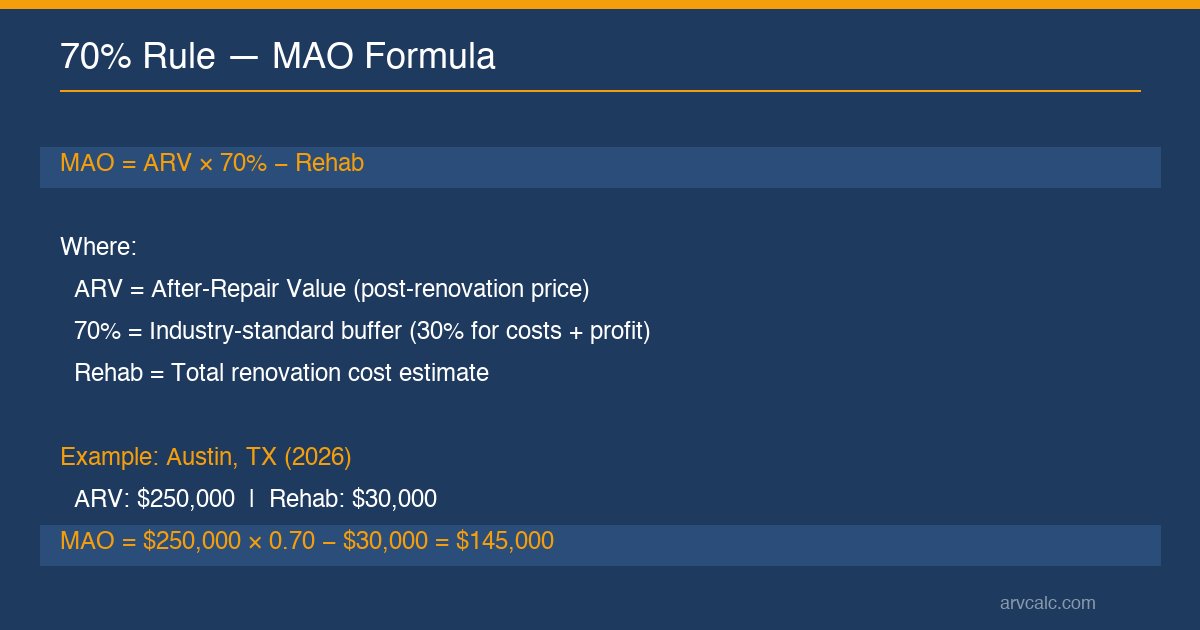
A fixer-upper hits the market in Austin at $189,000 — but what’s the most you should actually offer? The 70 percent rule calculator real estate investors trust answers that question in about three seconds. Plug in your After-Repair Value and rehab estimate, and the tool screens your Maximum Allowable Offer using the commonly used formula: MAO = ARV × 70% − Rehab. For a property with a $250,000 ARV and $30,000 in renovation costs, that’s a screened MAO of $145,000 — leaving a 30% buffer for financing, holding costs, selling expenses, and profit.
This 70 percent rule calculator real estate tool works as a first-pass screening heuristic, not a full deal analysis. As a 70 percent rule calculator real estate screening tool, think of it as the screening gate before you invest hours running detailed numbers. The tool offers three distinct modes: Standard 70% for quick screening, Adjustable Percentage (60–80%) for market-specific conditions, and Reverse Mode that lets wholesalers check whether their contract price fits the end-buyer’s 70% Rule. A built-in Financing Buffer toggle accounts for 2026’s high hard-money rates (12–14%), and two-tier status badges classify every deal from Deep Value to High Risk.
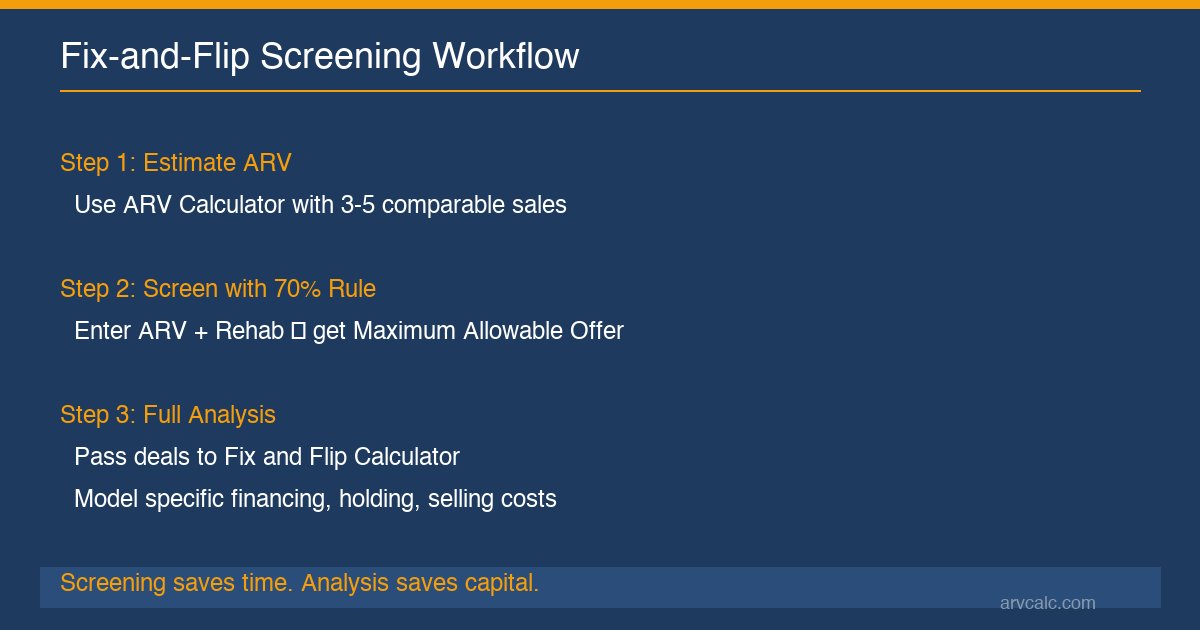
The 70 percent rule calculator real estate professionals rely on sits in the middle of a three-tool workflow most flippers use. First, the ARV Calculator establishes your After-Repair Value from comparable sales. Then this tool screens whether the deal passes at your target percentage. If it does, you run the full numbers in the Fix and Flip Calculator to model specific financing, holding, and selling costs before making an offer. Screening saves time. Full analysis saves capital.
One thing to be clear about upfront: the 70 percent rule is a screening heuristic — it embeds generalized cost assumptions that may not match your specific deal. For committed capital decisions, always validate with the Fix and Flip Calculator for precise modeling of your financing rate, holding period, and selling costs. The numbers here are projections, not guarantees.
On This Page
- How to Use the 70 Percent Rule Calculator
- Inputs and Outputs
- How the 70% Rule Formula Works
- What Is the 70 Percent Rule in Real Estate?
- What Your MAO and Status Badge Mean
- 70% Rule Benchmarks for 2026
- How to Use the 70% Rule by Investor Type
- Common Use Cases
- Industry Conventions
- Limitations
- Common Mistakes
- Frequently Asked Questions
- Related Calculators
How to Use the 70 Percent Rule Calculator
From ARV estimate to screened maximum offer in four steps
The 70 percent rule calculator real estate investors use most follows a simple four-step process. Here is how to get your screened MAO.
Step 1: Enter the After-Repair Value (ARV)
ARV is the estimated value of the property after full renovation — not the current as-is value and not the asking price. If you don’t have a solid ARV estimate yet, start with the ARV Calculator and pull 3–5 recent comparable sales within a 1-mile radius, sold in the last 6 months, with similar square footage. A 10% error in your ARV translates to a 7% error in your MAO. That is why experienced users of the 70 percent rule calculator real estate tool always start with solid comps, so accuracy here matters more than anywhere else in the process.
Step 2: Enter the Rehab Budget
Enter the total estimated renovation cost into the 70 percent rule calculator real estate screening tool to bring the property to ARV condition. Include materials, labor, permits, and a 10–15% contingency buffer. This tool classifies rehab costs automatically: cosmetic (0–15% of ARV), moderate (15–30%), heavy (30–40%), extensive (40–80%), and teardown territory (above 80%). When your rehab exceeds 40% of ARV, the tool triggers a warning — the 70% Rule margin may be insufficient for deals that heavy. Above 80%, the rule likely doesn’t apply at all.
Step 3: Select your mode
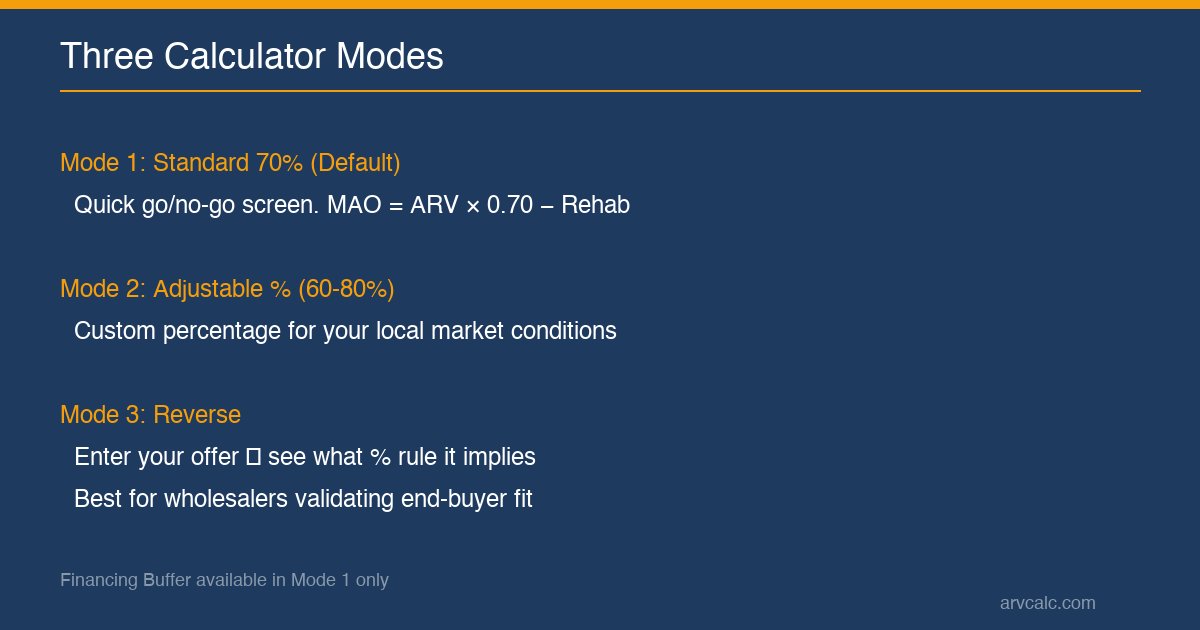
Mode 1 — Standard 70%: The default quick screen. Applies the common formula MAO = ARV × 0.70 − Rehab. Toggle “Include Financing Buffer” to subtract an additional 3% of ARV for 2026’s high-rate hard money environment.
Mode 2 — Adjustable % (60–80%): Lets you set a custom percentage reflecting local market conditions. Sunbelt markets in 2026 often require 72–75% to win bids. Financing Buffer is disabled here to prevent double-counting.
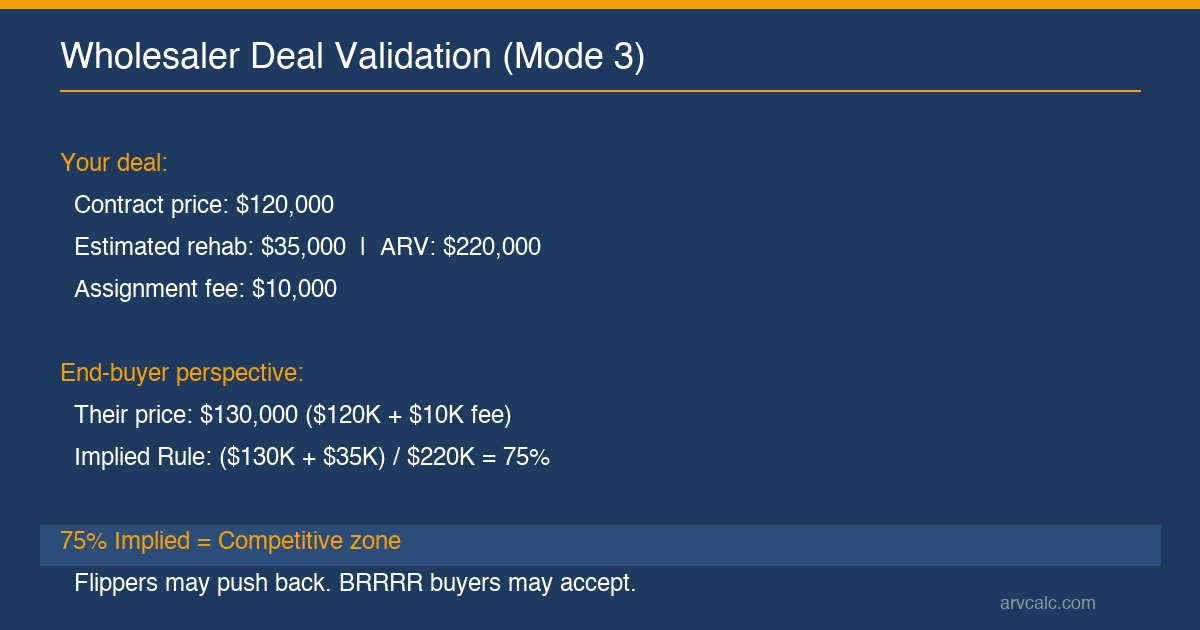
Mode 3 — Reverse: Enter your actual offer price, and the calculator shows what percentage rule it implies. Wholesalers use this to validate whether their deal is assignable to end-buyers at the 70% Rule. This makes the calculator real estate wholesalers depend on especially effective in Mode 3.
Step 4: Interpret your results
The primary output is your Maximum Allowable Offer (MAO), rounded to the nearest $500. Below that, you’ll see a color-coded Status Badge based on your Offer as % of ARV, plus secondary metrics: Gross Margin (Pre-Cost Buffer), Rule Buffer (Profit + Costs Allocation), and the percentage breakdown. In Mode 3, you’ll also see an Implied Rule percentage — a different metric from the Status Badge that includes rehab in the calculation.
Before committing capital on any property that passes this screen, run the full analysis in the Fix and Flip Calculator to model your specific financing rate, holding period, and selling costs. The 70 percent rule is a screening tool, not an underwriting tool.
Inputs and Outputs
What you enter, what this tool screens
| Input | Required | Default / Source |
|---|---|---|
| After-Repair Value (ARV) | Yes | From ARV Calculator or comps |
| Rehab Budget | Yes | Contractor estimate |
| Custom Percentage | Mode 2 only | 60–80%, default 70 |
| Your Purchase Price | Mode 3 only | — |
| Wholesale Assignment Fee | Optional | $0 |
| Financing Buffer | Mode 1 only | Off (subtracts 3% ARV) |
| Output | Formula | Purpose |
|---|---|---|
| Maximum Allowable Offer (MAO) | ARV × % − Rehab − Fee | Primary screening output |
| Gross Margin (Pre-Cost Buffer) | ARV − MAO − Rehab | Buffer for ALL costs + profit |
| Rule Buffer | ARV × (1 − %) | What the % allocates to costs + profit |
| Offer as % of ARV | MAO / ARV × 100 | Price vs resale value |
| Status Badge | Based on Offer % | Deep Value / Standard / Competitive / High Risk |
| Implied Rule (Mode 3) | (Purchase + Rehab) / ARV × 100 | What % rule your offer implies |
How the 70% Rule Formula Works
The commonly used screening heuristic — with a worked Austin, TX example
MAO = ARV × 70% − Rehab
The 70 percent rule has been used by flippers since the 1980s. The 30% buffer approximates two things: roughly 15–20% for all transaction costs (financing, holding, selling) and 15–20% for the investor’s profit margin. It’s a round-number heuristic that worked well in pre-2022 low-rate environments. In 2026, with hard money at 12–14%, that buffer is stretched — which is why the calculator includes a Financing Buffer toggle and an adjustable percentage range.
Worked Example: Austin, TX (2026)
You find a distressed 3-bed ranch in east Austin. Recent comps suggest an ARV of $250,000 after a moderate renovation. Your contractor bids $30,000 for the rehab (kitchen, baths, flooring, paint). You’re buying direct from the seller — no wholesale fee.
| Step | Calculation | Result |
|---|---|---|
| ARV × 70% | $250,000 × 0.70 | $175,000 |
| Minus Rehab | $175,000 − $30,000 | MAO = $145,000 |
| Gross Margin (Pre-Cost Buffer) | $250,000 − $145,000 − $30,000 | $75,000 |
| Offer as % of ARV | $145,000 / $250,000 × 100 | 58% |
| Status Badge | 58% ≤ 60% | Deep Value ✓ |
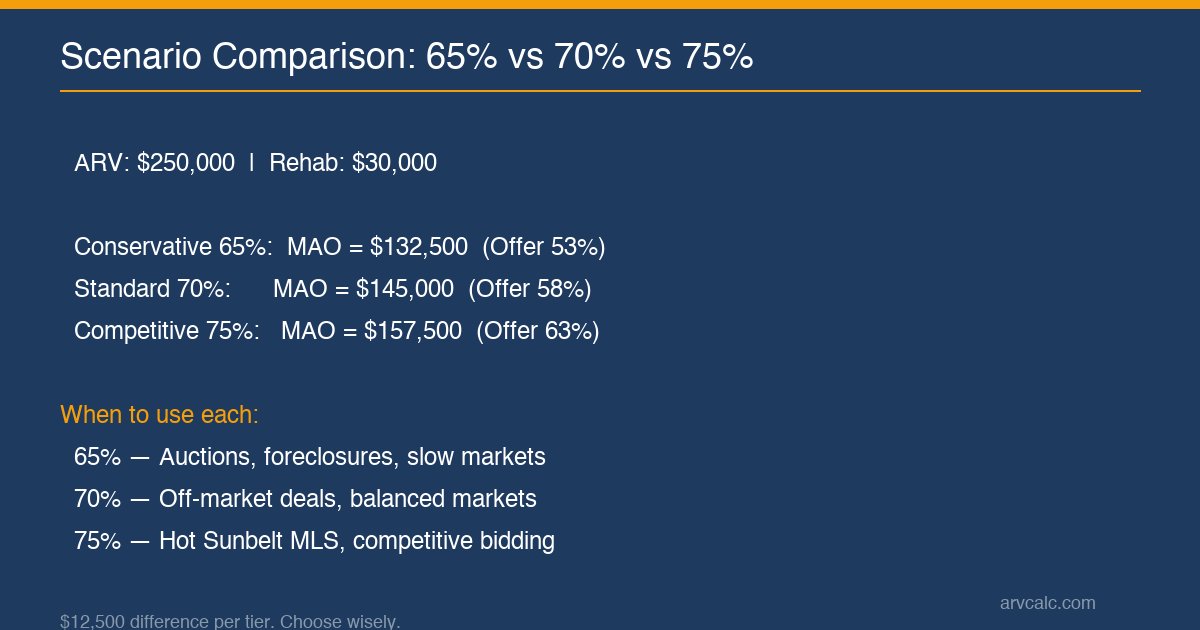
At 58% of ARV, this deal lands in the Deep Value zone — strong margin of safety. But what if you’re in a competitive market and need to bid higher? At 75%, your MAO jumps to $157,500 (Offer as % = 63%, Standard Flip Zone). That extra $12,500 gets you the deal but shrinks your buffer from $75,000 to $62,500. The calculator real estate investors use highlights exactly this tradeoff.
What Is the 70 Percent Rule in Real Estate?
The screening heuristic that’s been guiding flippers for 40 years
The 70 percent rule calculator real estate tool applies an commonly used screening heuristic used by fix-and-flip investors to quickly determine the maximum they can pay for a distressed property. The formula — MAO = ARV × 0.70 − Rehab — has been promoted by industry survey data, real estate educators, and flipper communities since the 1990s. The “70%” represents a buffer: roughly 15–20% for all transaction costs and 15–20% for the investor’s profit margin.
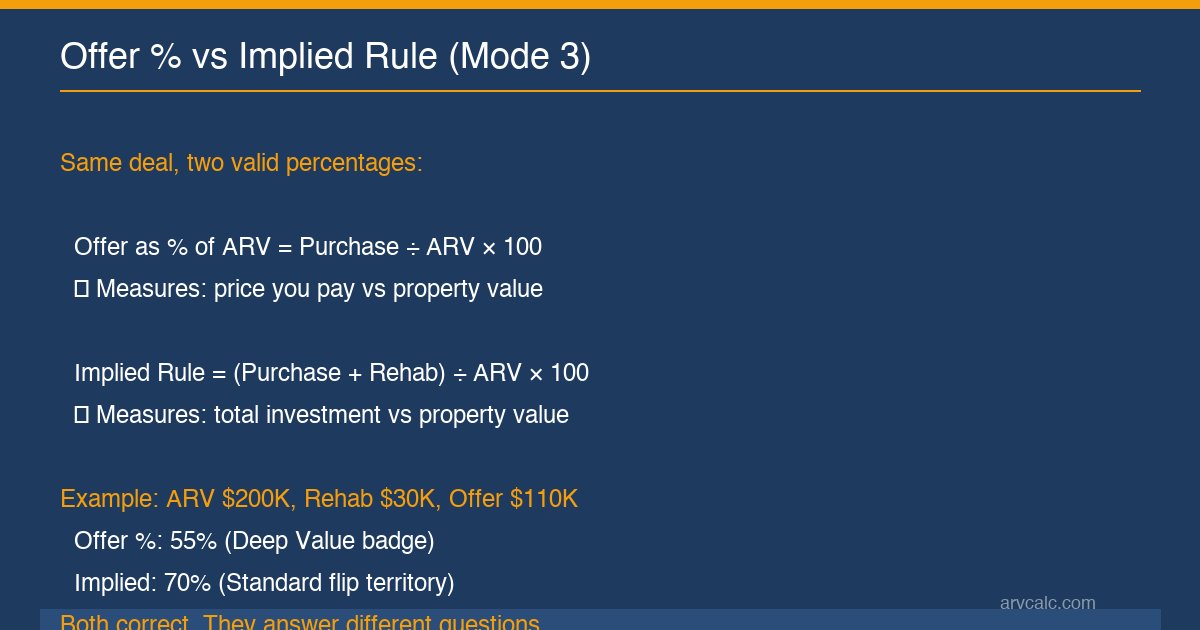
Here’s a distinction that trips up many investors. Two different percentages can describe the same deal. Offer as % of ARV measures your purchase price alone against the property’s value (MAO / ARV × 100). Implied Rule measures your total investment — purchase plus rehab — against the ARV ((Purchase + Rehab) / ARV × 100). Same deal, different lenses. The calculator shows both in Mode 3, and they can classify the same deal differently. A $110,000 offer with $30,000 rehab on a $200,000 ARV property shows 55% Offer (Deep Value) but 70% Implied (Standard territory). Both are correct.
The traditional 70% Rule was designed for ~5% interest rate environments. In 2026 with hard money at 12–14% and typical 4–6 month flips, financing alone eats 4–5% of ARV — eroding the 30% buffer significantly. The calculator addresses this two ways: a Financing Buffer toggle (Mode 1, subtracts 3% of ARV) or a higher custom percentage in Mode 2. Don’t combine both — that double-counts the adjustment.
What Your MAO and Status Badge Mean
How to read the color-coded screening output
Your MAO is the ceiling, not the target. The Status Badge reflects how aggressive your offer is relative to the property’s after-repair value. Lower percentage = more margin = safer deal.
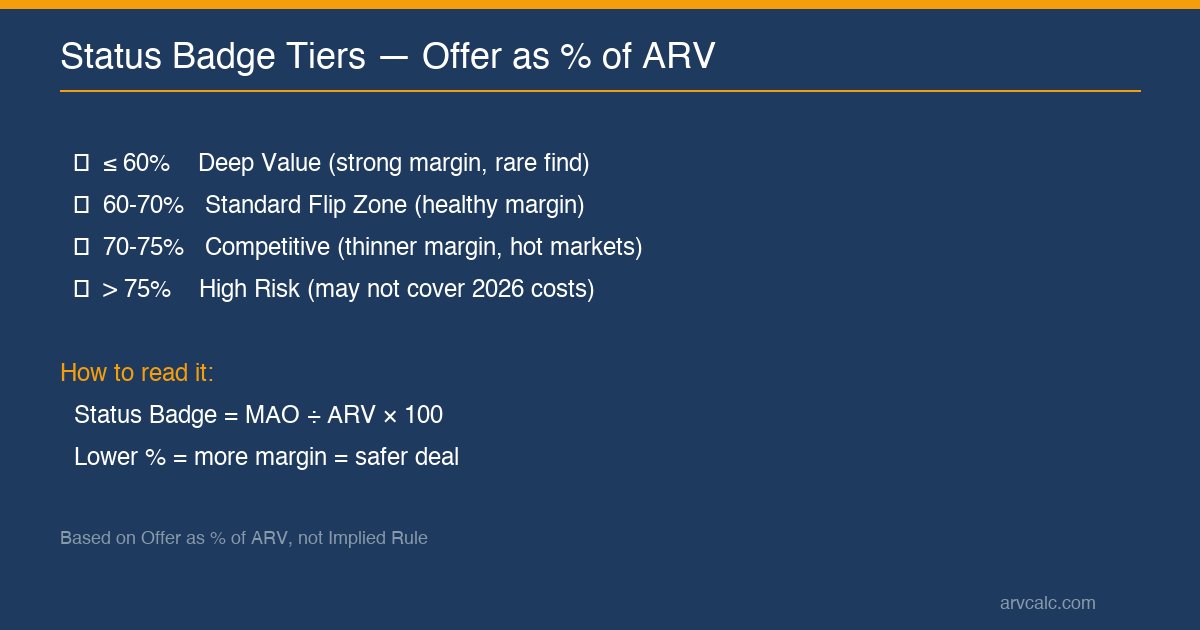
| Badge | Offer as % of ARV | What It Means |
|---|---|---|
| Deep Value (green) | ≤ 60% | Strong margin. Typical in auctions and foreclosures. |
| Standard Flip Zone (blue) | 60–70% | Healthy margin. Common for off-market deals. |
| Competitive (amber) | 70–75% | Thinner margin. Verify holding/financing costs carefully. |
| High Risk (red) | > 75% | May not cover 2026 costs. Consider BRRRR or rental exit. |
70% Rule Benchmarks for 2026
Market-specific ranges, rehab classification, and rate-environment context
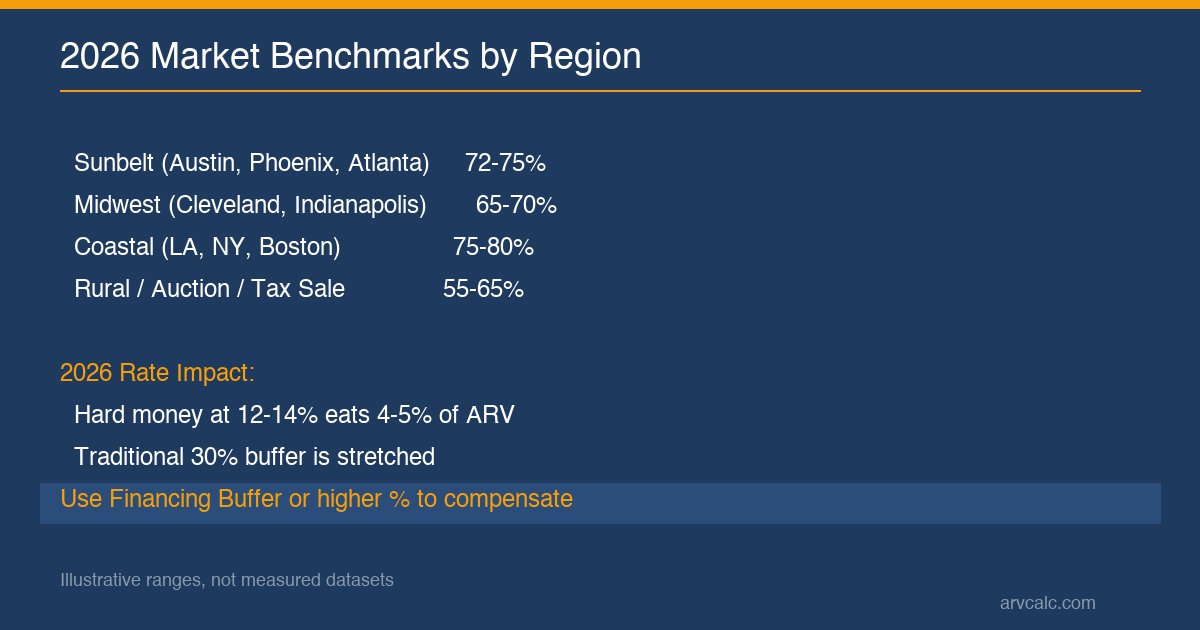
Most competitive Sunbelt markets (Austin, Phoenix, Atlanta, Dallas) now require 72–75% to win MLS-listed distressed properties. Off-market deals still clear 65–70%. Auction, foreclosure, and tax-sale properties can clear 55–65% for patient investors with cash. Midwest markets like Cleveland, Indianapolis, and Kansas City remain friendlier to the standard 70% benchmark. Any the calculator real estate tool should let you adjust for these regional differences. Coastal markets (LA, NY, Boston) often push 75–80%, making BRRRR a better exit than flipping.
| Rehab Level | Cost as % of ARV | Suggested Rule % |
|---|---|---|
| Cosmetic (paint, flooring, fixtures) | 0–15% | 70–75% |
| Moderate (kitchens, baths) | 15–30% | 68–72% |
| Heavy (systems, structural) ⚠ | 30–40% | 65–70% |
| Extensive (full gut renovation) | 40–80% | 60–65% + full analysis |
| Teardown / Rebuild | > 80% | 70% Rule may not apply |
These ranges are illustrative patterns, not measured statistical datasets. Your local market, deal source, and rehab scope determine the actual numbers. The calculator’s output on YOUR inputs always takes precedence over these aggregate expectations.
How to Use the 70 Percent Rule by Investor Type
Matching the screening approach to your business model
Beginner Flipper (1–3 deals)
Start with Mode 1 at the standard 70%. Enable Financing Buffer since you’re likely using hard money at 12–14%. Only pursue deals showing Green (Deep Value) or Blue (Standard Flip Zone). Always run the Fix and Flip Calculator before making your first few offers — don’t rely on screening alone when you’re still learning.
Experienced Flipper (10+ deals)
Switch to Mode 2 with your local market’s benchmark in this this tool real estate tool — probably 72–75% in Sunbelt, 65–70% in Midwest. Use the Status Badge as a quick visual filter when sourcing deals. Red means pass. The 70 percent rule becomes your primary MLS and wholesaler screening tool at this stage.
Wholesaler
The 70 percent rule calculator real estate wholesalers prefer — Mode 3 Reverse — is your bread and butter. Enter your contract price, rehab estimate, and ARV to see the Implied Rule. If it exceeds 75%, flippers probably won’t take the deal — you’ll need to target BRRRR or rental investors instead. Enter your Assignment Fee in Mode 1 to reverse-engineer the maximum you can offer the seller while keeping the deal assignable.
Real Estate Agent / Advisor
Use the calculator to set realistic expectations with investor clients. Open this tool real estate tool and show the Status Badge tiers to explain why investor offers typically fall at 55–70% of ARV. The Mode 2 benchmark band (65/70/75%) helps communicate local market competitiveness to sellers considering investor offers.
Hybrid Investor (Flip + BRRRR + Rental)
Mode 3 classifies deals by Implied Rule. Deals above 75% shift from flip territory to BRRRR or rental analysis. Use Compare Real Estate Deals to test the same property across all three strategies side by side.
Common Use Cases
When the calculator real estate investors should reach for
- Quick MLS screening: Enter ARV + estimated rehab to see if the list price falls within viable offer range. If MAO is significantly below asking, the deal likely isn’t worth pursuing.
- Wholesaler deal validation: Use Mode 3 to check whether your under-contract property is assignable at your target price. Implied Rule above 75% = hard sell to flippers.
- Auction maximum bid: Compute MAO at 65% (conservative) before the auction starts. reconsider the assumptions if bidding exceeds that number — auction psychology pushes otherwise-disciplined investors into thin-margin deals.
- Off-market seller education: Show the 70% Rule calculation to explain why you can’t pay closer to ARV. Transparency builds trust and accelerates negotiation.
- Portfolio deal-flow screening: Run every incoming deal through this tool as a first-pass filter. Only deals passing the screen (Green or Blue badge) advance to the Fix and Flip Calculator for full analysis.
How This Calculator Aligns with Industry Conventions
70% Rule history, peer tools, and profit margin benchmarks
The 70 percent rule was popularized in the 1980s–1990s fix-and-flip community and gained mainstream adoption through industry surveys and educator networks in the 2010s. The 30% buffer rationale breaks down roughly as: financing 2–4%, holding 5–8%, selling 6–7%, and profit 15–20%. It was designed for lower-rate environments (~5% mortgages pre-2022). The 2026 high-rate environment challenges the rule, which is why this calculator offers the Financing Buffer and adjustable percentage.
Industry profit benchmarks for flips: minimum target $25K–$50K per flip (national average), 15–20% profit as percentage of ARV is standard, below 10% isn’t worth the risk, above 25% is rare and usually signals aggressive ARV or underestimated rehab. Use the Fix and Flip Calculator to convert your 70 percent rule screening into a precise profit projection.
How does this compare to other tools? industry survey data includes the 70% Rule in their flip calculator but not as a standalone screening tool. DealCheck combines it with full flip analysis in one screen. This the calculator real estate investors prefer is unique in offering three modes, two-tier status interpretation, 2026 Financing Buffer, and smooth CTA flow to the Fix and Flip Calculator and BRRRR Calculator.
Limitations of the 70 Percent Rule
What this screening tool cannot tell you
It’s a screening heuristic, not a full deal analysis. This tool real estate investors depend on embeds generalized cost assumptions — your actual financing, holding, and selling costs may differ significantly. High-rate environments (2026 hard money at 12–14%) stretch the embedded profit margin. Always validate with the Fix and Flip Calculator before committing capital. This tool is not a substitute for professional analysis — consult your CPA and lender for specifics.
- Does not model holding time. The rule assumes a typical 4–6 month flip. Longer holds inflate costs beyond the 30% buffer.
- Assumes typical rehab scope. Works best for cosmetic to moderate rehab (0–30% ARV). Extensive rehab requires full analysis.
- ARV accuracy determines result accuracy. A 10% ARV error becomes a 7% MAO error. Use the ARV Calculator with 3–5 comps.
- Market conditions can invalidate the buffer. Hot markets requiring 75%+ offers and slow markets with extended hold times both erode margins.
- Not a substitute for professional advice. Before committing capital: CPA for taxes, attorney for contracts, lender for financing terms, contractor for rehab scope.
When Not to Use This Calculator
- Rental property analysis → use Rental Property Calculator
- BRRRR strategy → use BRRRR Calculator
- Commercial / multifamily 5+ units → different valuation framework
- New construction or teardown → 70% Rule doesn’t apply
- Tax planning → consult CPA
Common Mistakes When Using the 70 Percent Rule
Five errors that cost fix-and-flip investors real money
- Overestimating ARV. Most common error. Investors anchor on the best comp instead of the median of 3–5. Overestimating ARV by 10% inflates MAO by 7%, turning marginal deals into seemingly viable ones.
- Underestimating rehab. Forgetting permits, structural surprises, labor cost inflation, or the 10–15% contingency buffer. Get contractor bids, not online estimates.
- Treating 70% as gospel. It’s a mid-cycle benchmark, not a law of physics. Competitive 2026 Sunbelt markets require 72–75%. Slow rural markets support 65%. Use Mode 2 with local data.
- Double-counting financing costs. Applying Financing Buffer (Mode 1) AND using Custom % (Mode 2) both account for financing. The calculator prevents this by disabling the buffer in Mode 2.
- Relying on screening alone. The 70 percent rule is a first-pass filter. Before signing a purchase agreement, use the calculator real estate screening as step one, then run the deal through the Fix and Flip Calculator to model YOUR specific financing rate, holding period, and selling costs.
Frequently Asked Questions
What’s the difference between this and the Fix and Flip Calculator?
the calculator real estate flippers use is a quick screening heuristic — one formula, one output (MAO). The Fix and Flip Calculator runs full deal analysis with specific financing rate, holding period, selling costs, and precise profit projection. Use the 70 percent rule to screen which deals warrant deeper analysis. Use Fix and Flip before committing capital on any deal that passes the screen. This tool is not a substitute for that full analysis.
Why is the 70% Rule “70%” specifically?
The 30% buffer approximates 15–20% for all transaction costs (financing ~2–4%, holding ~5–8%, selling ~6–7%) and 15–20% for investor profit margin. It’s a round-number heuristic calibrated for pre-2022 low-rate environments. In 2026, consider Mode 2 at 72–75% or Mode 1 with Financing Buffer enabled.
Why does the Status Badge show “Deep Value” but my Implied Rule says “Standard”?
They measure different things. Status Badge uses Offer as % of ARV (purchase price only). Implied Rule uses total investment (purchase + rehab). Example: offer $110K, rehab $30K, ARV $200K. Offer % = 55% (Deep Value). Implied Rule = 70% (Standard). Both are correct — they answer different questions about the same deal.
Can I use the 70% Rule for BRRRR?
BRRRR has a different cost structure — you’re refinancing, not selling. Traditional 70% Rule margins don’t apply directly. Use the BRRRR Calculator for refi-focused analysis. That said, deals with Implied Rule ≥ 75% (aggressive for flipping) can sometimes work as BRRRR since you’re holding long-term.
What about wholesale fees?
Enter your Assignment Fee in Advanced inputs. MAO then represents the seller-facing offer (after your fee is extracted). Your end-buyer pays MAO + Fee, which should still land within their 70% Rule. If it doesn’t, the deal isn’t assignable at your fee.
When should I use 65% vs 70% vs 75%?
65% = conservative (slow markets, auctions, patient investors). 70% = commonly used (balanced markets, off-market deals). 75% = aggressive (hot Sunbelt MLS, competitive bidding). Use Mode 2 with your local market’s benchmark, informed by recent flip sales and investor network feedback.
Does the 70% Rule work in 2026 with high interest rates?
The traditional 70 percent rule was calibrated for ~5% rates. With 2026 hard money at 12–14%, financing eats 4–5% of ARV. Two adjustments: enable Financing Buffer in Mode 1 (subtracts 3% of ARV), or use Mode 2 with 72–75%. Don’t combine both — that double-counts.
My MAO is negative. Is the deal dead?
Negative MAO means rehab exceeds the buffer (ARV × Percentage). Usually this signals a teardown or major-rehab project, not a standard flip. Options: re-verify your ARV and rehab estimates, explore as BRRRR or buy-and-hold rental, or pass on the deal.
Screen Your Next Fix-and-Flip Deal
Enter ARV and rehab budget — get your screened MAO in seconds. Free, no signup.
Related Calculators
Tools that complement the calculator real estate analysis workflow
- ARV Calculator — Estimate After-Repair Value using comparable sales. Use this before this tool to establish an accurate ARV input.
- Fix and Flip Calculator — Full deal analysis with financing, holding, selling costs, and precise profit projection. Use after the 70% Rule screening passes.
- BRRRR Calculator — Buy-Rehab-Rent-Refi-Repeat analysis for deals too thin for flipping but viable as long-term holds.
- Compare Real Estate Deals — Side-by-side comparison using the calculator real estate workflow — Rental vs BRRRR vs Flip strategies for the same property.
- Cash-on-Cash Return Calculator — Measure annual return on invested cash for rental property analysis.
Data sources: National Association of Realtors (2026 market data), industry survey data (industry conventions). This content is for educational purposes — not investment advice. Consult qualified professionals before making financial decisions.
Disclaimer: This article is for educational purposes only and does not constitute financial, investment, legal, or tax advice. Real estate investing involves significant risk, including the potential loss of capital. All numbers, rates, and projections are illustrative examples and may not reflect your specific situation. Consult qualified financial, legal, and tax professionals before making any investment decisions.
Frequently Asked Questions
Is this calculator free?
Yes, all calculators on ArvCalc are completely free with no signup required. Enter your numbers and get instant results. You can save results as PDF or share via URL.
How accurate are the calculator results?
The calculator performs exact mathematical calculations based on your inputs. The accuracy depends on how realistic your assumptions are — use actual market data for rent, taxes, insurance, and vacancy rather than optimistic estimates. Always verify key inputs with local data.
Can I save my calculations?
Yes. Use the Share button to generate a URL with your inputs saved, or export results as PDF. You can also bookmark the shared URL to return to your analysis later.
What inputs do I need?
At minimum: property value, rental income, and basic expenses (taxes, insurance). For more accurate analysis, add vacancy rate, maintenance reserves, property management fee, and financing details. The more inputs you provide, the more accurate the output.
Do I need to create an account?
No. All calculators work instantly without registration, login, or email. Just enter your numbers and get results. No data is stored on our servers.
Leave a Reply